Writing
How to Set Up Google Search Console for a Cairns Business
A plain-English guide to setting up Google Search Console: why it matters and what to do once the data starts coming in. From a Cairns SEO consultant.

Most small business websites are flying blind. The owner pays for the site, maybe pays someone to run a few ads, and then has no real idea what is happening between their business and Google. They are guessing. Google Search Console is the tool that stops the guessing, it is free, and most businesses I work with in Cairns and across Far North Queensland either have not set it up or set it up years ago and never looked at it again.
This guide walks you through getting it running on your own site. It is not difficult. The harder part, which I will be honest about at the end, is knowing what to do with what it tells you.
What Search Console actually is
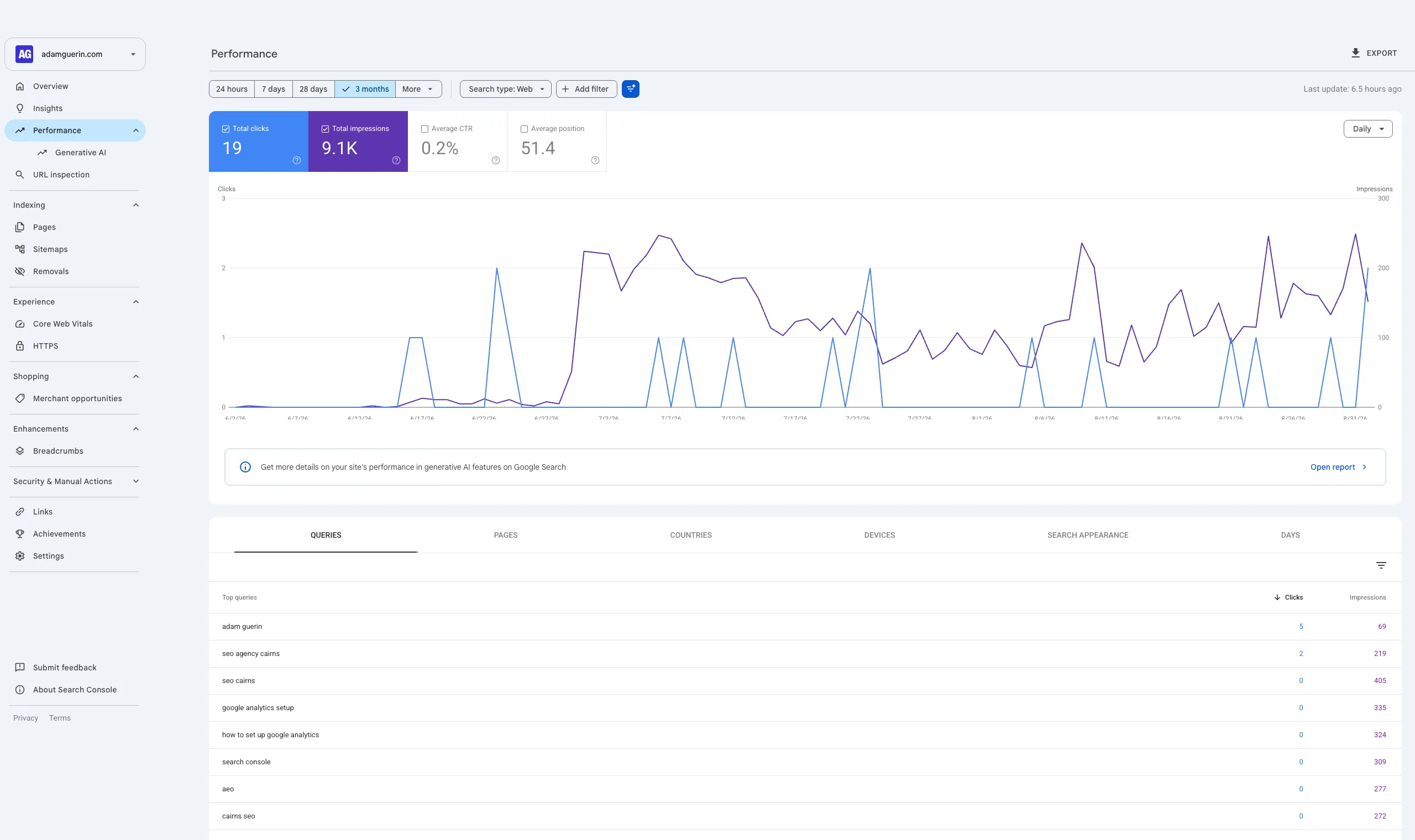
Google Search Console is the closest thing you will ever get to Google speaking to you directly about your website. It shows you the words people typed into Google before they landed on your site, how many times you showed up, how many people clicked, which of your pages Google has actually stored in its index, and where it has run into problems crawling or understanding your site.
That last point matters more than people realise. A page that is not indexed cannot rank. It does not matter how good the content is or how much you spent on the site. If Google has not stored the page, it does not exist as far as search is concerned. Search Console is where you find out.
People confuse it with Google Analytics, so here is the clean distinction. Analytics tells you what people do once they are on your site. Search Console tells you what happens out in Google before they ever arrive. You want both, and they do different jobs.
Before you start
Do one thing properly before you touch anything. Decide which Google account owns this.
I have seen too many businesses verify Search Console under a former employee’s personal Gmail, or under the account of a web designer they no longer work with. When that relationship ends, the data and the access can walk out the door with it. Create or use a business Google account that the business controls, and set it up under that. If other people need access later, you can grant it to them without handing over the keys.
You will also need to be able to either edit your domain’s DNS settings or add a small piece of code to your site. Which one depends on the method you choose, covered next.
Choosing your property type
When you open Google Search Console and add a new property, Google offers you two options, and the labels are not helpful if you have never seen them before. This is the one decision in the setup worth slowing down for.
Domain property. This tracks everything under your domain. Every version of the address, with www and without, the secure and non secure versions, every subdomain, all of it unified in one place. This is the option I recommend for almost every small business. You get the complete picture and you are not missing data because it is sitting in a version of your site you forgot to add.
URL prefix property. This tracks only one exact version of your address. It is useful for specific situations, like watching a single section of a large site on its own, but for a standard small business website it leaves gaps you will not notice until they cause a problem.
Pick the Domain property. Google’s own help page on adding a property explains both in detail if you want the full reasoning.
Verifying that you own the site
Google will not show you the data until you prove the site is yours. For a Domain property there is one method, and it is the most durable one anyway.
You add a small text record, called a TXT record, to your domain’s DNS settings. Google gives you the exact value to paste in. You log into wherever your domain is managed, which might be your registrar or a service like Cloudflare, add the record, save it, and click verify back in Search Console.
DNS changes can take anywhere from a few minutes to a few hours to take effect, so if it does not verify on the first attempt, that does not mean you did it wrong. Wait and try again.
The reason I favour this method over the alternatives is that it survives changes. If you redesign your site, switch hosting, or change platforms, an uploaded file or a tag buried in your theme can vanish and quietly break your verification. The DNS record stays put. Google’s verify your site ownership page covers the other methods if you have chosen a URL prefix property instead, including HTML file upload, a meta tag, Google Analytics, and Tag Manager.
Submit your sitemap
Once you are verified, do one more thing immediately. Submit your sitemap.
A sitemap is a file that lists the pages on your site you want Google to know about. Most modern website platforms generate one automatically, usually at an address ending in /sitemap.xml. In Search Console you go to the Sitemaps section, enter that address, and submit it. This helps Google find and crawl your pages more efficiently. It does not force anything to rank, and anyone who tells you it does is selling something, but it removes a layer of friction between your site and the index.
What to look at first
Data takes a few days to start appearing, so do not panic if the reports are empty on day one. Once it fills in, three things are worth your attention straight away.
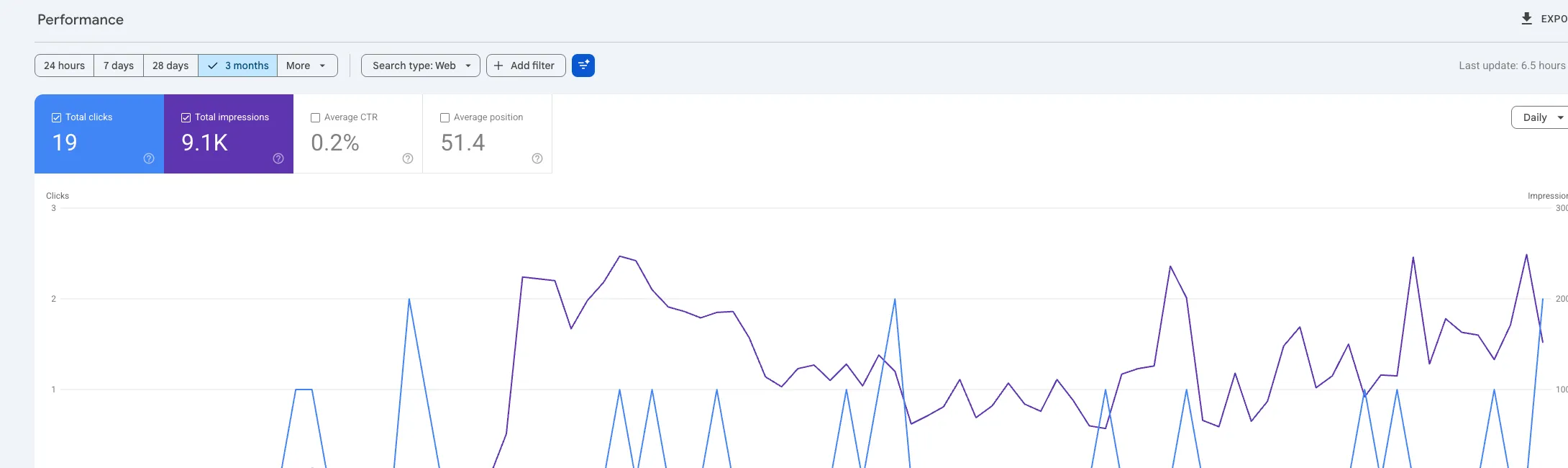
The Performance report shows the searches you are appearing for and whether people are clicking. This is where you find out that you are showing up for something you never thought about, or that you are invisible for the exact thing you sell.
The Page Indexing report shows which pages Google has stored and which it has not, with reasons for the exclusions. For a local business, finding that your main service page is not indexed is the kind of problem that explains a lot of quiet phones.
The URL Inspection tool lets you check any single page, see how Google views it, and request that Google take another look after you have made changes.
Where the real work starts
Here is the honest part. Setting up Search Console is the easy ninety minutes. Reading it well is the job that never finishes.
The reports do not tell you what to do. They tell you what is happening. A drop in clicks could be a Google update, a technical fault, normal seasonal swing, or a competitor doing something smarter. The same numbers can point to four different causes and four different responses, and acting on the wrong reading wastes money and sometimes makes things worse. November 2025 was a good example, with Google confirming nothing had changed while rankings moved anyway, which I went through in why your rankings shifted when Google said nothing changed. Knowing which pages to leave alone matters as much as knowing which to fix. That judgement comes from having watched a lot of these patterns play out across a lot of real sites, and it is exactly the kind of thing that is hard to learn from a screenshot and much faster to learn with someone walking through your own data with you.
If you run a local business here in the region, the way Search Console data connects to your local SEO in Cairns and FNQ is where it gets genuinely useful, because the searches that matter to you are local ones, and the tool will show you whether you are winning them.
Get it set up this week. It is free, it takes you an evening, and it gives you a real view of your business in Google instead of a guess. When you want to turn that view into decisions, that is what the training is for.
Get in touch if you’d like to talk this through.