Writing
How to Set Up Google My Business (Google Business Profile)
Claiming your Google Business Profile is the best free move a local business can make. Here's how to do it right, from a Cairns SEO consultant.

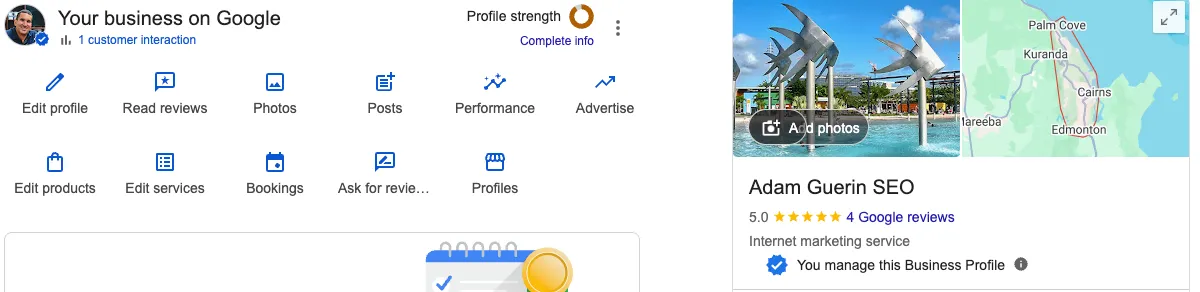
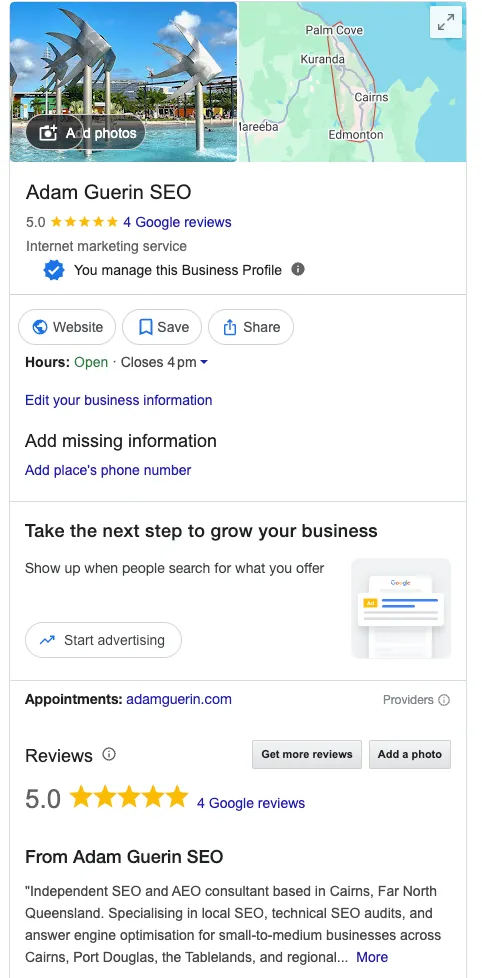
For a local business, this is the single most valuable free thing you can do online. Not the website. Not the ads. This. When someone in your town pulls out their phone and searches for what you sell, the businesses that appear on the map with reviews, hours, and a call button are the ones with a properly set up profile. The ones that do not show up are invisible at the exact moment a customer is ready to act.
Most businesses I look at across Cairns and the wider region are in one of three states. They have never claimed their profile. They claimed it years ago and have not touched it since. Or, more often than people expect, someone else controls it, a former staff member or an old marketing company, and the owner has no access. This guide covers getting it set up and getting it right, whichever situation you are starting from.
First, the name confusion
If you have heard it called Google My Business, or GMB, that is the same thing. Google renamed it to Google Business Profile back in 2021, and a few years ago retired the old separate app and dashboard. You now manage your profile directly inside Google Search and Google Maps when you are signed in as the verified owner. So if you go looking for the old “Google My Business” app and cannot find it, that is why. The tool did not disappear, it moved.
How Google decides who shows up
Before you touch anything, it helps to understand what you are actually influencing. Local ranking on Maps and in the local results comes down to three things, and you cannot pay Google to move any of them.
Relevance is how well your profile matches what someone searched. A complete, accurate, detailed profile gives Google more to match against, which is half of why filling everything in matters.
Distance is how close you are to the person searching, or to the area their search implies. You cannot move your business, but you can make sure Google knows exactly where you are and what areas you serve.
Prominence is how well known and trusted your business is. Reviews feed into this heavily, as does how the rest of the web refers to your business. This is the factor you have the most room to build over time.
Keep those three in mind, because every step below is really about strengthening one of them.
Before you start
Same rule as every other Google tool, and it bites hardest here. Set this up under a Google account the business owns, not a personal one belonging to a staff member or a contractor. A Business Profile is tied to whoever verified it. If that person leaves, regaining control is a slow, painful process, and I have watched businesses lose months to it. Use a business account from the start.
Then check whether a profile already exists. Google often auto generates a basic listing for a business it knows about, even if nobody created one. Search your business name and town on Google. If a listing appears, you are claiming an existing profile. If nothing comes up, you are creating one from scratch. Either way, do not create a second profile if one already exists, because duplicate listings split your reviews and confuse Google about which one to trust.
Claiming or creating your profile
If your business already appears on Google or Maps, open the listing and look for the “Claim this business” or “Own this business?” option. Follow the prompts. If there is no listing yet, go to business.google.com/add and add your business, entering your name, category, address or service area, phone number, and website. Google’s add or claim your Business Profile page walks through both paths.
If you find the listing but it says someone else already manages it, with part of an email address showing, that is the former staff member or old agency situation. You do not create a new one. You request access through the request ownership process. Google emails the current owner, who can approve or deny. If they do not respond within a few days, you may be able to claim it yourself. It is a process with built in waiting periods, so start it sooner rather than later.
Verifying that it is yours
Google will not show your profile publicly until you verify you control the business. You do not get to pick the verification method. Google decides which options you qualify for based on your business type, category, and location, and the most common one now is video verification. That means recording a short continuous video showing your premises, your signage, and some proof that you manage the place, like keys or equipment. For a service business with no shopfront, you show branded vehicles, uniforms, or tools instead.
One useful connection. If you have already verified your site in Google Search Console, some businesses qualify for instant verification, which is one more reason that setup is worth doing first. Google’s verify your business page covers the options.
Filling it in properly
A bare, half completed profile barely helps. A complete one is what feeds the relevance signal.
The most important single field is your primary category. This tells Google what your business fundamentally is. Be specific and accurate, because a vague or wrong category keeps you out of the searches that matter most. Add secondary categories for the other things you do.
Get your name, address, and phone number exactly right, and make sure they match what is on your website letter for letter. Inconsistency between your profile, your site, and other listings around the web erodes Google’s confidence in you. Same business name, same address format, same phone number, everywhere.
Fill in your hours, and keep them current, including public holidays. There is nothing worse for a customer than driving to a business your profile said was open. Add a genuine description of what you do, list your services, and add real photos of your work, your team, and your premises. Photos do real work here, both for customers deciding and for how complete Google considers your profile.
Reviews are the lever
Of everything that builds prominence, reviews matter most. More genuine reviews, a higher average rating, and a steady flow over time all support your local ranking, and they are often the deciding factor for the customer too.
Ask happy customers to leave a review, and make it easy for them. Reply to the ones you get, the good and the bad, because it shows Google and future customers that you are present and that you care. What you must not do is buy reviews, incentivise them, or write fake ones. Google is good at detecting this and the penalties are not worth it. A slow, honest accumulation of real reviews beats a suspicious burst every time.
Where the ongoing work starts
Here is the honest part, same as the other guides. Setting the profile up is a one off afternoon. Keeping it working is the ongoing job, and it is where local results are actually won or lost.
A profile is not a set and forget asset. It rewards activity, fresh photos, current hours, answered questions, a continuing flow of reviews with replies. Choosing the right categories, deciding how to define your service areas across the towns you cover, keeping your business details consistent across every directory and listing on the web, and reading which of your efforts are actually shifting your visibility, that is the part that takes judgement and experience rather than an afternoon and a help article. It is also tightly bound to the rest of your local SEO in Cairns and FNQ, because your profile and your website pull in the same direction or they undermine each other. Local SEO in a regional market also plays by different rules to national SEO, and I’ve set out why separately.
Get it claimed, verified, and properly filled in this week. It is free and it is the highest return move available to a local business. Turning it into a profile that consistently wins the searches that matter, and keeping it there, is what the training is for.
If you’d rather this was handled for you, that’s something I offer.
Get in touch if you’d like to talk this through.